Connected TV to mobile measurement

With connected TV (CTV) to mobile measurement, you can follow a user from their CTV ad view to a mobile app install. This cross-device insight can drive growth and inform your marketing strategy by offering a comprehensive view of your user conversion journey.
- See the role CTV plays in your marketing mix
- Leverage the second screen experience
- See the full scope of your acquisition funnel
Partner integrations
Adjust currently supports connected TV ad to mobile measurement with many different partners. We are integrated with all of the partners below and more, some of whom we cannot publicly advertise.
Many of our partners operate as a managed service, meaning that the partner platform handles the implementation of your ad creative and Adjust links. Learn how to set up your CTV campaign with a managed service. For non-managed services, you can find the dedicated setup guides linked for each partner in the list below.
- ABEMA
- AccessTrade VN
- Adelphic
- Adflex
- Adikteev Activation
- AdJar
- AdMaxTech
- Adonest
- Ads & More
- Adspector
- Adsreverb Digital
- AdTheorent
- AdTiming
- Advisible
- AdzMedia
- Ahajoy
- AJA
- AMoAd Inc
- Anymind DSP
- Appalgo
- Appflix Media
- Appier
- Appiness
- Applovin
- AppMobo
- App Samurai
- Appsart Mob
- Apptimus
- ApptributeAds
- ArabyAds
- Ascendad
- Axponent
- Bidease
- BidMatrix
- Bigo Ads
- Bing
- BlissPointMedia
- Blue Whale
- Bytemobi
- Cadent
- Castify.ai
- CCHANGE
- Chestnut Tech
- CLEARPIER
- CollectCent
- CPMStar by GSN Games
- CTV House
- Custom partner
- Dataseat
- Digital Alliance
- Digitalpowermobi
- Digital Remedy
- DipperAds
- Discord
- Disney
- D-Lab
- Edge226
- eksMedia
- Esternbird
- Facebook Web
- FeedMob
- Flexmedia
- Found
- FuboTV
- Gadmobe Interactive
- Gamebassadors
- Geniee
- Glance
- GlobalWide Media
- GMT Hub
- Google Ads App Asset (PMax, Local, Smart)
- Google Ads Discovery / Demand Gen
- Google Ads Discovery / Demand Gen (Web app)
- Google Ads Display
- Google Ads Hotel
- Google Ads Local
- Google Ads Performance Max
- Google Ads Performance Max (Web app)
- Google Ads Search
- Google Ads Shopping
- Google Ads Smart
- Google Ads Video
- Google Ads Video (Web app)
- Go With Media
- GPM Ads
- GridAds
- High on Ads
- HIVEHUB TECHMEDIA
- Hulu
- Hybrid.ai
- Iconpeak
- iHeart Media
- i-mobile
- Influencer
- InMobi DSP
- Inovit
- Intellect Ads
- Interscope Ads
- iQU
- Jampp
- Joinship
- Kaden
- Kayzen
- KyPI
- Lemmonet
- LG Ads
- LINEヤフー広告 ディスプレイ広告 (LY Ads Display Ads)
- LINEヤフー広告 検索広告 iOS(LY Ads Search Ads iOS)
- Logicad
- Madhive
- Mapendo
- mDSP
- Medialinks
- MediaQX
- mediasmart
- MG Media UK
- Mingle Ads
- Mintegral CTV
- MNTN
- MobAvenue Media
- Moboost
- Mobrand
- Mobupps
- MOLOCO
- Motiv Intelligence
- Movable Ad
- MUNIMOB TECHNOLOGY
- Nasimobi Technology Limited
- Nativex
- NAVER
- NetMarvel
- Neuron DSP
- Nexxen
- Notch
- Nvmob
- Olyzon
- One Engine Media
- Paramount+
- Performance Launchpad
- Persona.ly
- Pharaoh Media Limited
- Phronesis Company
- Pikumob
- Platform161
- Playdigo Inc.
- Playmetrica
- Plazkart
- Plexus Media
- PubMint
- Pubteam
- PWN Games Network
- Rakuten TV
- Reddit Inc
- Red for Publishers
- Reliz LTD
- Remerge
- Resurgex
- RevX
- Roku OneView
- RZR
- Samsung DSP
- Samsung TV
- Seemobile
- SFBTECH DSP
- Sijak Media Ltd
- SKMADS
- Smadex
- Solta
- SpinX
- StackAdapt
- Starti Limited
- Stellartech
- Surgex
- Sync API
- Taboola
- Tatari
- Tec-do
- The Trade Desk
- Thing Or Two
- TikTok Web
- tpagency
- TVekstra
- TvScientific
- Twitch TV
- UNICORN
- Unicorndsp | Unicross
- Unity CTV
- Universal Ads
- Upravel
- Upsmobi
- Upstrive
- Valueleaf Services
- Vibe
- VIBE WAVE
- Vidaa
- Virgil Media
- Virtuads
- VK Ads (ex. myTarget)
- Vserv.mobi
- Winklelab
- Xandr
- XOOM
- X Web
- Yandex Direct
- Yeahmobi
- Yolo Group-SG
- YouAppi
- Z2A Digital
- Zen Totem
- ZinkAds
- Zucks
- Zucks Ad Network
- アフィタウン
- テレビ東京
- フジテレビ予約型 | Fuji TV
- 新TVer広告
- 旧TVer広告(セルフサーブ)
- 旧TVer広告(フルマネージド)
- 有道智选 | Youdao Zhixuan
- 至真科技 | ZHIZHEN TECH INC
Contact connectedtv@adjust.com for more information about how to proceed with partners you do not see referenced on our Help Center.
How it works
To attribute ads shown on CTV devices to mobile app installs and post-install events, Adjust uses IP-based matching. This is a type of probabilistic modeling that only uses the IP address of the end-user's devices. We use this type of matching because the IP address is the only identifier that can be found on both CTV and mobile devices.
With cross-device IP-based attribution, you can measure the users that view an ad for your mobile app over CTV and respond by installing the app on their phone.
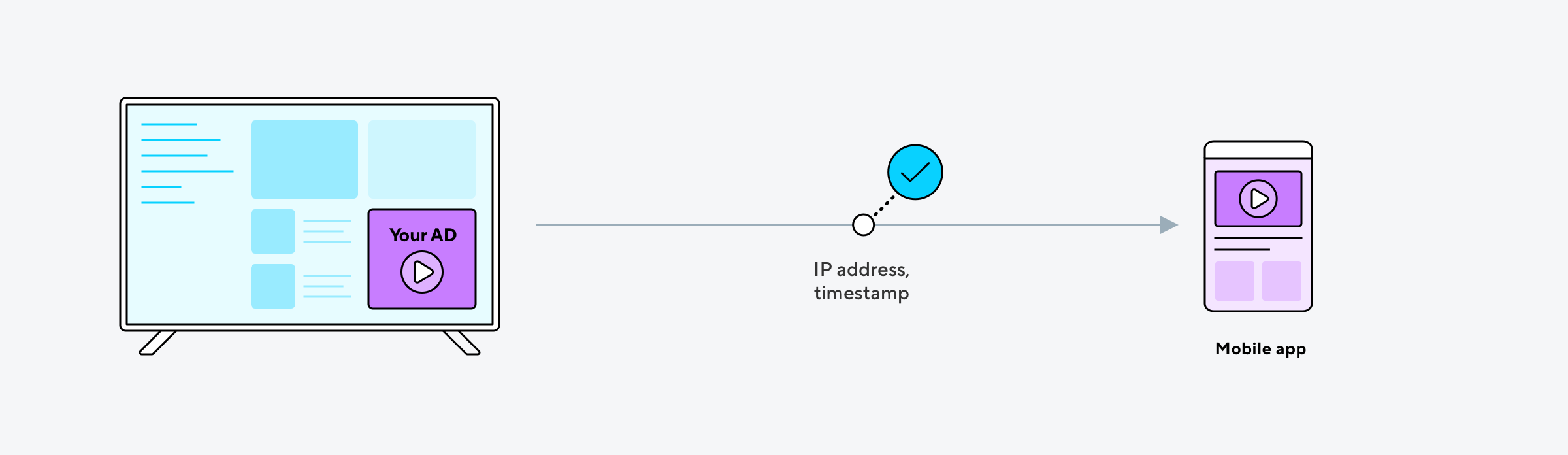
Most ad campaigns that are run on connected TV and promote mobile apps use in-stream advertising through an app on the CTV or OTT device. For example, ads might be served via a banner before or during content or there will be a traditional commercial break.
CTV impressions in the attribution waterfall
Ad networks must send CTV to mobile impressions using Adjust's Server-to-server (S2S) API in the following situations:
- The ad network serves CTV ads server-side.
- The advertised app is a single-platform app AND the ad network isn't capable of serving two impression links for an individual ad.
Make sure your ad network supports sending CTV to mobile impressions S2S.
CTV ad impressions are measured using cross-device links, which are added to your TV creative. Since CTV-to-mobile attribution relies on IP-based probabilistic matching, CTV impressions are evaluated differently from deterministic touchpoints such as device ID matches and clicks.
By default, CTV impressions are assigned the lowest priority in Adjust's attribution waterfall. This conservative approach ensures that deterministic attribution methods are always preferred when multiple eligible engagements exist.
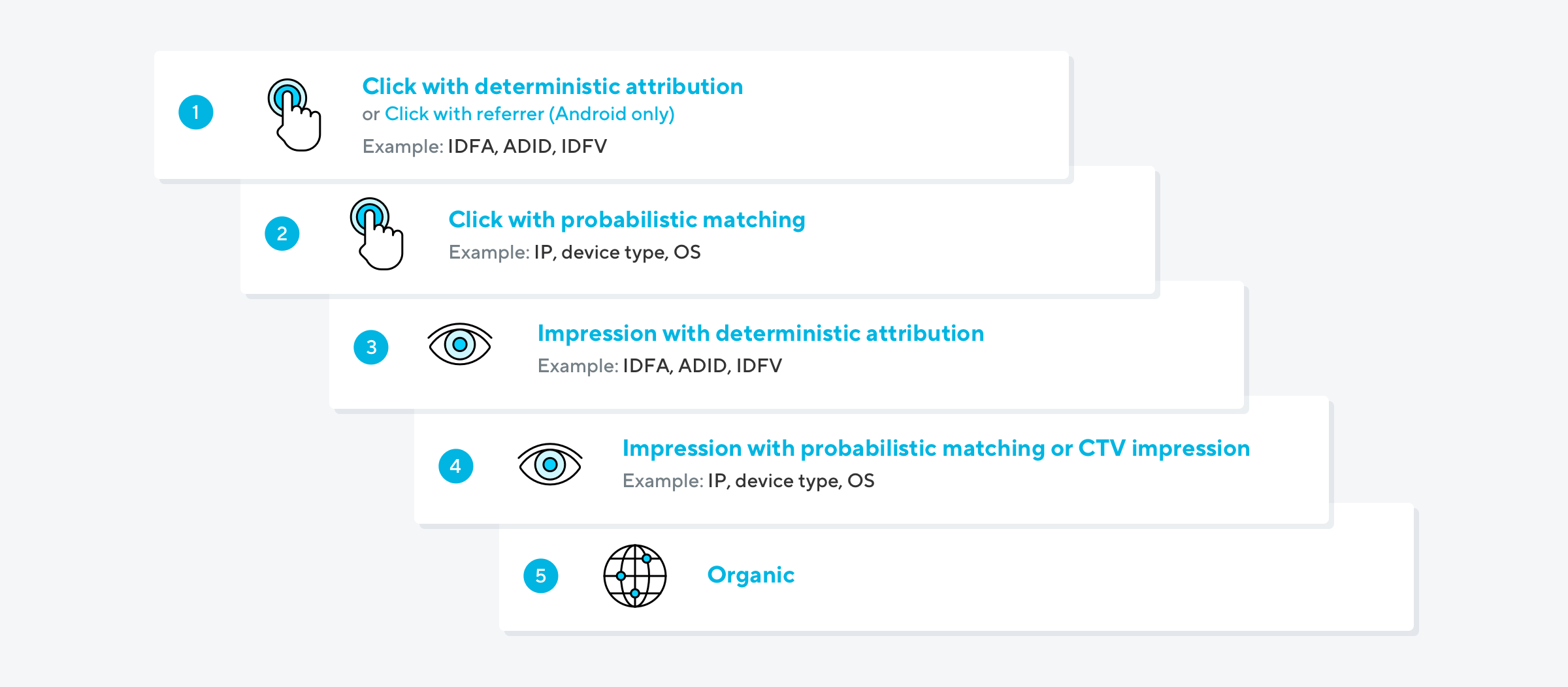
With the default configuration, installs and reattributions are typically attributed to CTV impressions only when no higher-priority touchpoint is eligible for attribution.
For advertisers that want greater visibility into the contribution of CTV campaigns, Adjust offers configurable attribution waterfalls. These allow you to change how CTV impressions are prioritized relative to other engagement types, including assigning them equal priority to clicks. You can also use an optional Priority Attribution Window to control how long eligible CTV impressions receive the configured priority.
Available attribution waterfall configurations
In your app's Attribution Waterfall settings, choose the configuration that best reflects how you evaluate the contribution of CTV advertising within your overall acquisition strategy.
| Waterfall | Description |
| Classic Attribution (Default) | Uses the standard Adjust attribution waterfall. CTV impressions remain the lowest-priority engagement and are considered only after clicks and other eligible impressions. |
| Equal Priority | CTV impressions receive the same attribution priority as clicks. Eligible CTV impressions and clicks are considered at the same priority level. |
| Prioritize CTV over Regular Impressions | CTV impressions are prioritized above standard mobile impressions but remain below all click engagements. This helps increase CTV attribution while preserving click precedence. |
| CTV First | CTV impressions receive the highest priority in the attribution waterfall, ahead of all clicks and impressions. This configuration maximizes attribution to eligible CTV touchpoints. |
| CTV over Search inventories | CTV impressions are prioritized above search advertising inventories, while remaining below click engagements from other advertising networks. |
These configurations change the priority of eligible CTV impressions within the attribution waterfall. They do not change:
- Attribution windows
- Attribution eligibility requirements
- IP-based probabilistic matching methodology
- Attribution logic for non-CTV engagements beyond the selected waterfall configuration
Priority Attribution Window
The Priority Attribution Window controls how long a CTV engagement receives the priority selected in your Attribution Waterfall settings.
You can set it to 1–6 hours. If you leave it empty, your configured priority applies for the full attribution window set for that engagement type. For example, if the applicable cross-device impression attribution window is 12 hours, an eligible CTV impression receives the configured priority throughout those 12 hours.
This setting is available for all applicable CTV priority configurations, including Equal Priority, Prioritize CTV over Regular Impressions, CTV First, and CTV over Search inventories.
After the Priority Attribution Window expires, the engagement returns to its default priority. It can still receive attribution until its applicable attribution window expires.
For example, with Equal Priority, a 24-hour cross-device impression attribution window, and a 6-hour Priority attribution window configured:
| Time since the CTV impression | Result |
| 4 hours | Eligible for attribution with Equal Priority. |
| 12 hours | Eligible for attribution with the default priority. |
| 25 hours | No longer eligible for attribution. |
Changing the Priority Attribution Window does not change attribution eligibility.
CTV reattributions
Connected TV advertising is a powerful tool to maintain engagement from your existing mobile app users. To measure its impact, you can use Adjust's support for cross-device reattribution. This means you can see when a user resumed activity in your mobile app following a CTV ad engagement.
To perform reattribution, Adjust uses the same probabilistic modeling methodology as applied for cross-device links. CTV reattribution is available on demand and applied at the app-level.